|
||||
|
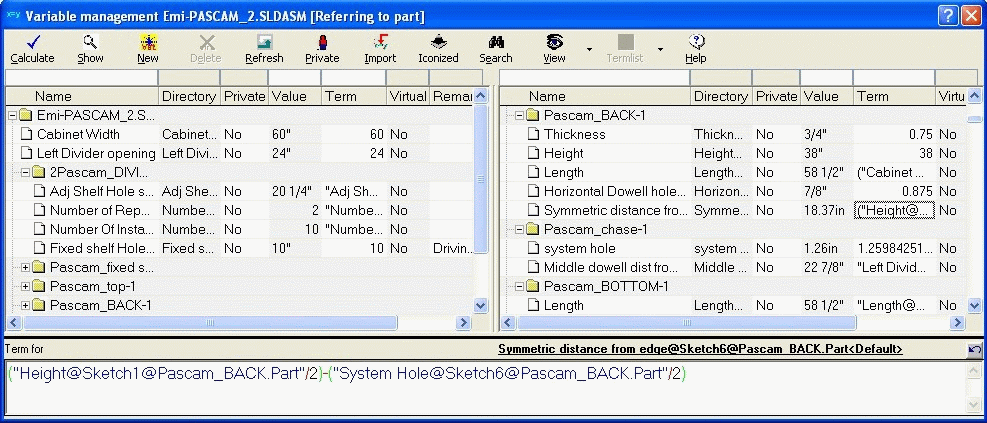
Efficient management of variables A central component of the VariXPASCAM approach is the fact that all dimensions are considered as variables that can be controlled by equations and conditions. Across all components and and sub-assemblies of the underlying SolidWorks® model. The different dimensions of a typical model are displayed hierarchically in a spreadsheet structure to manage them more easily. You can hide individual components or sub-assemblies just by a mouse click, giving you a better focus on the relevant dimensions you are working on at the moment. The newly added input fields in the table header, which allow to reduce the display of the variable table by entering search terms or values (common wildcard symbols available) is also an improvement for quick and easy access to your relevant dimensions. But the variable management in PASCAM
WoodWorks
has even more functions: Equations simply can be edited, modified and arranged by Drag & Drop, by selecting them in the model or input by keyboard. In this respect the option to split up the variable table view vertically is especially benefiting, because it simplifies and accelerates considerably those paste & copy operations which have to be done across several sub-assemblies and components. Users who work with extensive assemblies and/or users who always work with the PASCAM Variable management open on a secondary computer monitor like this option very much. With the PASCAM equation solver a new and alternative operation mode is available at the PASCAM Variable management. It handles equations substantially faster than the conventional SolidWorks® equation solver. Continue your tour of PASCAM WoodWorks.
|
|
|||
Please send e-mails with questions or comments regarding this website to info@pascam.de Copyright © PASCAM GmbH, Amtsgericht Stuttgart (HRB 731755) Update: 2010-03-03 |
||||