|
||||
|
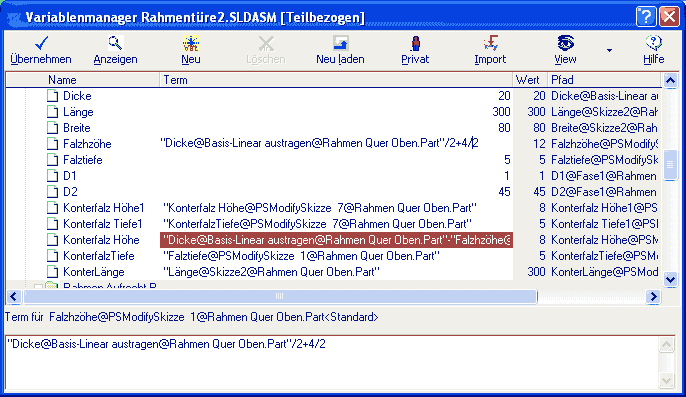
Equations by Drag & Drop VariXPASCAM finally enables the user to arrange equations simply with the mouse. Equations can be entered conventionally by keyboard or arranged by Drag & Drop. The equations have the same performance range as SolidWorks® equations and are also mapped to genuine SolidWorks® equations. The equations can be arranged by:
Simple assignments of the dimensions to each other are also available by Drag & Drop. All equations and values are always saved on the top-level assembly or part.
The equations can be arranged directly in the table. For better visibility the currently edited equation expression is displayed separately in an input field at the bottom of the VariXPASCAM window.
Continue your tour through VariXPASCAM.
|
|
|||
Please send e-mails with questions or comments regarding this website to: info@pascam.de Copyright © PASCAM GmbH, Amtsgericht Stuttgart (HRB 731755) Update: 2009-11-20 |
||||